Best Free Kanji Learning App for JLPT N5–N1
Please support us by sharing!

Learning Japanese Kanji can feel overwhelming when meanings, readings, stroke order, vocabulary and revision are spread across several resources. A useful Kanji app should do more than work as a simple dictionary. It should help you follow an organized learning path, practise what you study, review difficult characters and clearly see your progress. Learn Kanji: JLPT N5–N1 brings these tools together in one Android app for beginners, intermediate learners and advanced JLPT students.
Explore Learn Kanji
Swipe on mobile, drag with your mouse, use a trackpad or select the arrows to explore the app.


Swipe left or right on mobile. On desktop, hold and drag the screenshots.
Why Learn Kanji Is Different
It combines detailed Kanji information, active practice and personal organization instead of functioning only as a dictionary.
Complete JLPT Path
Study Kanji in an organized path from beginner JLPT N5 through advanced N1.
Detailed Learning
Learn meanings, Onyomi, Kunyomi, example words, translations and similar Kanji.
Writing and 3D Tools
Practise writing on a canvas and explore supported Kanji through an interactive 3D viewer.
Games and Quizzes
Review readings with games, JLPT quiz sets and focused quizzes for individual Kanji.
Clear Progress Tracking
Separate Not Started, Learning and Learned Kanji and view progress for every JLPT level.
Your Own Study System
Create personal categories, save favourites, add notes and place one Kanji in multiple lists.
What Is Learn Kanji: JLPT N5–N1 App?
Learn Kanji: JLPT N5–N1 app is designed to help Japanese learners study, practise and organize Kanji. It covers all major JLPT levels, beginning with N5 and continuing through N4, N3, N2 and N1.
The app focuses on active learning rather than showing only a dictionary definition. You can study a character’s readings and vocabulary, practise writing, play a reading game, take a quiz, save a personal note and update your learning status.
Explore JLPT Kanji by Categories
Studying a long list of Kanji can sometimes feel difficult when you do not know where to start. The Learn Kanji app now makes JLPT study easier to organize with category-based learning inside each JLPT level.
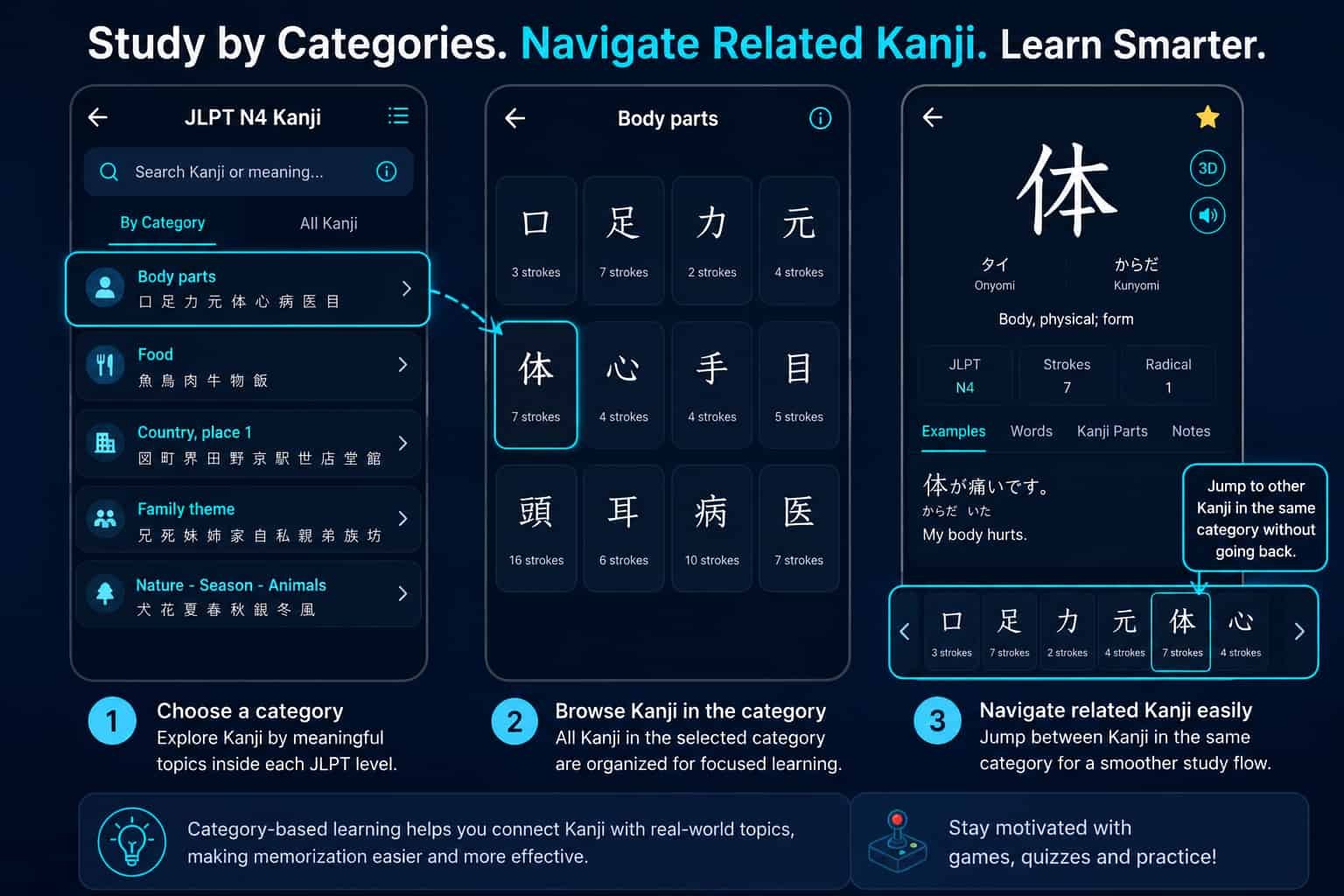
Instead of viewing every Kanji as one large list, you can explore related characters together through topics such as Body Parts, Food, Places, Family, Nature and Animals. This gives you a more focused way to study Kanji that share a common theme or everyday usage.
After opening a category, you can browse its Kanji and select any character to view its detailed information. The Kanji detail page also lets you move between related Kanji in the same category, making it easier to continue studying without repeatedly returning to the category list.
Study Kanji by JLPT Level
A large, unorganized Kanji list can be difficult to use when you are preparing for a specific examination level. Learn Kanji separates its content into JLPT N5, N4, N3, N2 and N1.
Every level displays a searchable Kanji list together with learning information. You can see how many characters are learned, currently learning or not started. This makes it easier to choose a realistic study target and understand how much progress you have made.
Detailed Kanji Information
The Kanji detail page is the main learning area of the app. Depending on the information available for the selected character, you can study:
- English meanings
- Onyomi readings
- Kunyomi readings
- JLPT level information
- Japanese example words
- Hiragana readings
- English translations
- Example sentences and related vocabulary
- Similar Kanji that may be easily confused
- Stroke information and related practice tools
Seeing a character inside real vocabulary is important because an isolated Kanji does not always show how it is pronounced or used. Example words connect the character to practical Japanese that may appear in books, applications, signs, conversations and JLPT questions.
Kanji Stroke Order and Writing Practice
Recognizing a Kanji and writing it correctly are different skills. Learn Kanji includes stroke resources and an interactive writing canvas so you can practise drawing characters directly on your phone.
You can follow visual guidance, repeatedly draw the character, clear the canvas and try again. Supported Kanji may also provide stroke animation and downloadable stroke-order PDF resources for additional study.
Interactive 3D Kanji Viewer
For supported characters, the app provides an interactive 3D Kanji viewer. You can rotate the model, adjust the view and examine the character from different angles.
The 3D viewer is an additional visual learning tool. It does not replace reading or writing practice, but it can make complex characters more interesting and easier to remember.
Kanji Games for Reading Practice
Repeating the same study activity every day can become tiring. The app includes interactive Kanji games that let you choose and arrange the correct reading parts.
The games are organized by JLPT level. After answering, you can check the correct reading and review an explanation, providing a more active study experience than simply reading a list.
JLPT Quizzes and Single-Kanji Quizzes
Learn Kanji includes general JLPT quizzes and focused quizzes for individual Kanji. From the JLPT quiz area, you can choose a level, select an available test and answer questions covering readings, meanings, vocabulary and usage.
The single-Kanji quiz is useful when one particular character remains difficult. Open that Kanji from its detail page and begin focused practice using questions connected to the character. After completing a quiz, you can review your score, correct answers, wrong answers and explanations.
Track Learning Progress
Every Kanji can be placed into one of three learning stages:
- Not Started: You have not begun actively studying the Kanji.
- Learning: You are currently reviewing and practising the Kanji.
- Learned: You feel confident recognizing and understanding the Kanji.
Kanji marked as Learning or Learned are available in separate lists. This gives you a simple way to continue your study without searching through every JLPT level again. Level progress also shows how much of N5, N4, N3, N2 or N1 you have already covered.
Create Your Own Kanji Categories
One of the most useful organization features is the ability to create your own categories or custom Kanji lists. Every learner struggles with different characters, so one fixed list is not enough for everyone.
You can create categories such as Difficult Kanji, JLPT Exam Review, Weekly Practice, Similar Kanji, Work Vocabulary or any category that matches your personal learning plan.
The same Kanji can be added to several categories. For example, a character may belong to both your Difficult Kanji category and your N3 Exam Review category. This gives you complete control over how your revision material is organized.
Save Favourites and Personal Notes
You can add important characters to your favourites and return to them later without searching the full JLPT list. You can also save your own personal note for a Kanji.
A note might contain a memory hint, a special meaning, a word encountered at work or a reminder about a reading you frequently confuse. These personal connections can make difficult characters easier to remember.
Search Kanji More Easily
The app provides search tools to help you locate the character or word you need. Depending on the available information, you can search using Kanji, English meanings, Hiragana, Katakana, Onyomi or Kunyomi.
Search works alongside the structured JLPT lists, allowing you to either study level by level or quickly open a particular character when you encounter it elsewhere.
Start Learning Without Creating an Account
You do not need to register an account before using the main learning features. Learning statuses, favourites, personal notes and custom categories are stored locally on your device.
This means you can install the app and begin learning immediately. Because this information is stored locally, clearing the app’s storage or uninstalling the app may also remove saved progress.
Who Is This Kanji App For?
- Beginners starting with JLPT N5 Kanji
- N4 and N3 learners developing stronger reading skills
- N2 and N1 learners organizing advanced Kanji
- Students preparing for JLPT examinations
- Learners who want stroke-order and writing practice
- People who prefer games and quizzes for active revision
- Learners who want favourites, notes and personal categories
How to Start Using Learn Kanji
- Install Learn Kanji: JLPT N5–N1 from Google Play.
- Choose the JLPT level that matches your current ability.
- Browse or search for a Kanji you want to study.
- Open the detail page and review its meanings, readings and examples.
- Change its status to Learning.
- Use writing practice, games or quizzes for active revision.
- Add difficult characters to favourites or your own category.
- Change the status to Learned when you feel confident.
View Learn Kanji on Google Play
Is It the Best Free Kanji Learning App?
There is no single Japanese learning app that is perfect for every person. Some learners want only a dictionary, while others prefer flashcards, textbooks or video lessons.
Learn Kanji is a strong free option for learners who want structured JLPT Kanji lists, detailed character information, writing practice, 3D viewing, games, quizzes and personal progress tools in one app.
If your goal is to study systematically from JLPT N5 toward N1 while organizing difficult Kanji in your own categories, Learn Kanji is worth adding to your Japanese study routine.
Conclusion
Learning Kanji requires time, repetition and regular practice. A good application cannot remove that effort, but it can make the process clearer and easier to manage.
Learn Kanji: JLPT N5–N1 combines level-based study, detailed Kanji information, example vocabulary, stroke-order practice, a writing canvas, 3D Kanji models, games, quizzes, progress tracking, favourites, personal notes and user-created categories.
Whether you are starting with N5 or reviewing advanced N1 characters, the app gives you several ways to learn, practise and organize Kanji in one place.