Kanji Learning App: Why Our JLPT N5–N1 App Is Different from Other Kanji Apps
Please support us by sharing!
There are many useful Kanji apps available, but they do not all solve the same problem. Some are mainly dictionaries. Others focus only on flashcards, writing practice or short quizzes.
Those tools can be helpful, but learning hundreds of Kanji requires more than checking a meaning and moving on. Learners need a clear study path, a way to return to difficult characters, different forms of practice and a simple method for tracking progress.
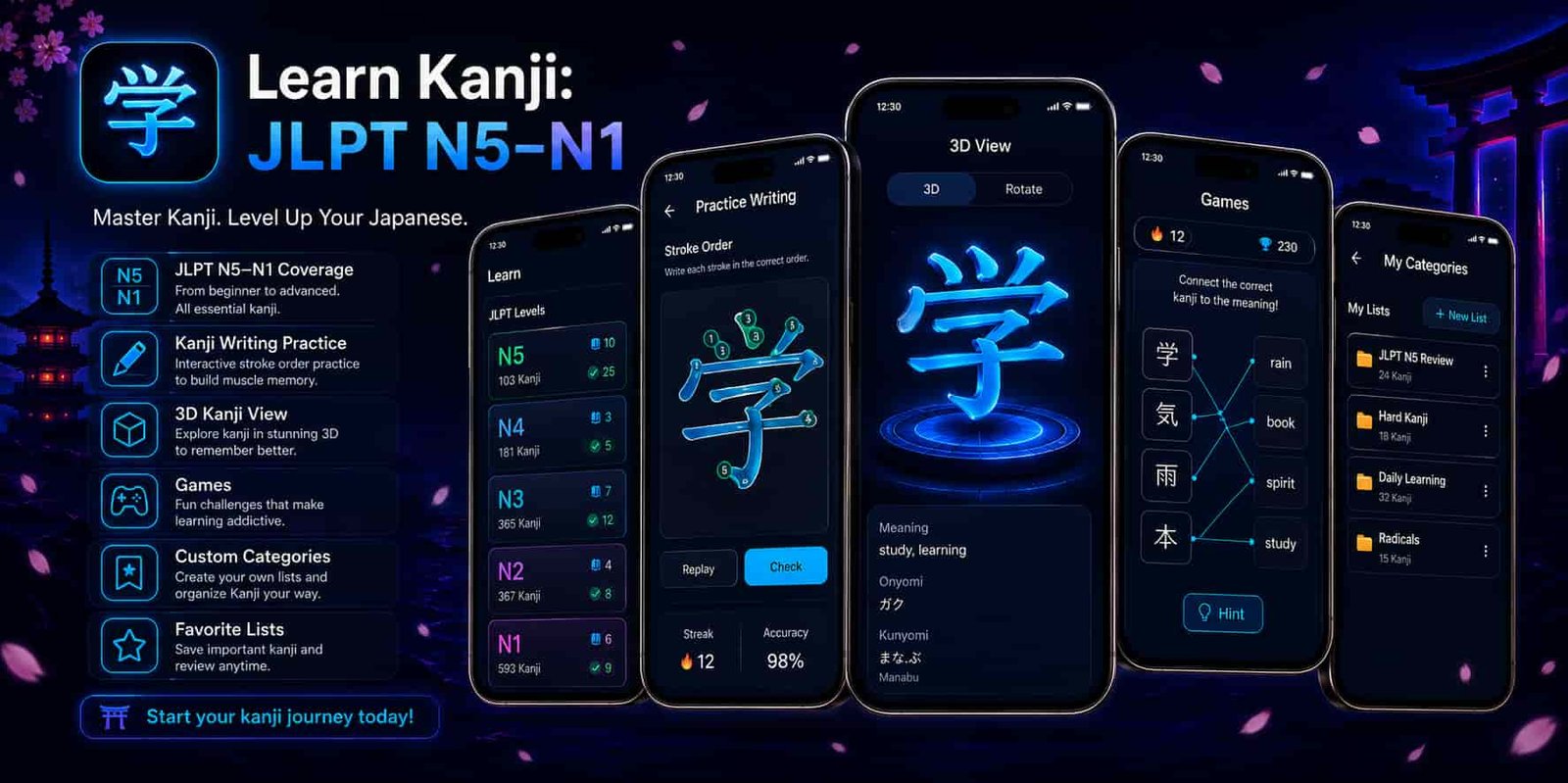
That is the idea behind Learn Kanji: JLPT N5–N1. The app brings detailed Kanji information, JLPT-level study, an advanced practice canvas, a 3D Kanji viewer, games, quizzes, custom study lists, personal notes and progress tracking into one place.
The app is free to use. You do not need to purchase separate JLPT levels, unlock basic learning tools or start a subscription before you can study. We also try to keep advertisements limited so they do not become the main part of the experience.
What Makes Learn Kanji Different?
It is designed to support the complete learning process, from discovering a Kanji to practising and reviewing it.
JLPT N5 to N1
Follow an organized Kanji learning path from beginner N5 to advanced N1.
Advanced Practice Canvas
Draw and practise Kanji directly on your phone using an interactive canvas.
Interactive 3D Viewer
Rotate supported Kanji and examine their shape from different viewing angles.
Custom Study Lists
Create personal lists for difficult Kanji, exam revision or weekly study goals.
Games and Quizzes
Review through JLPT quizzes, Kanji games and focused quizzes for individual characters.
Clear Progress Tracking
Separate the Kanji you have not started, are learning and have already learned.
A Kanji App Should Help You Study, Not Only Search
Looking up a Kanji is useful when you meet an unfamiliar character, but searching alone does not create a study routine.
You may understand the meaning today and completely forget it next week. You may also remember the meaning but confuse the reading, stroke order or a similar-looking character.
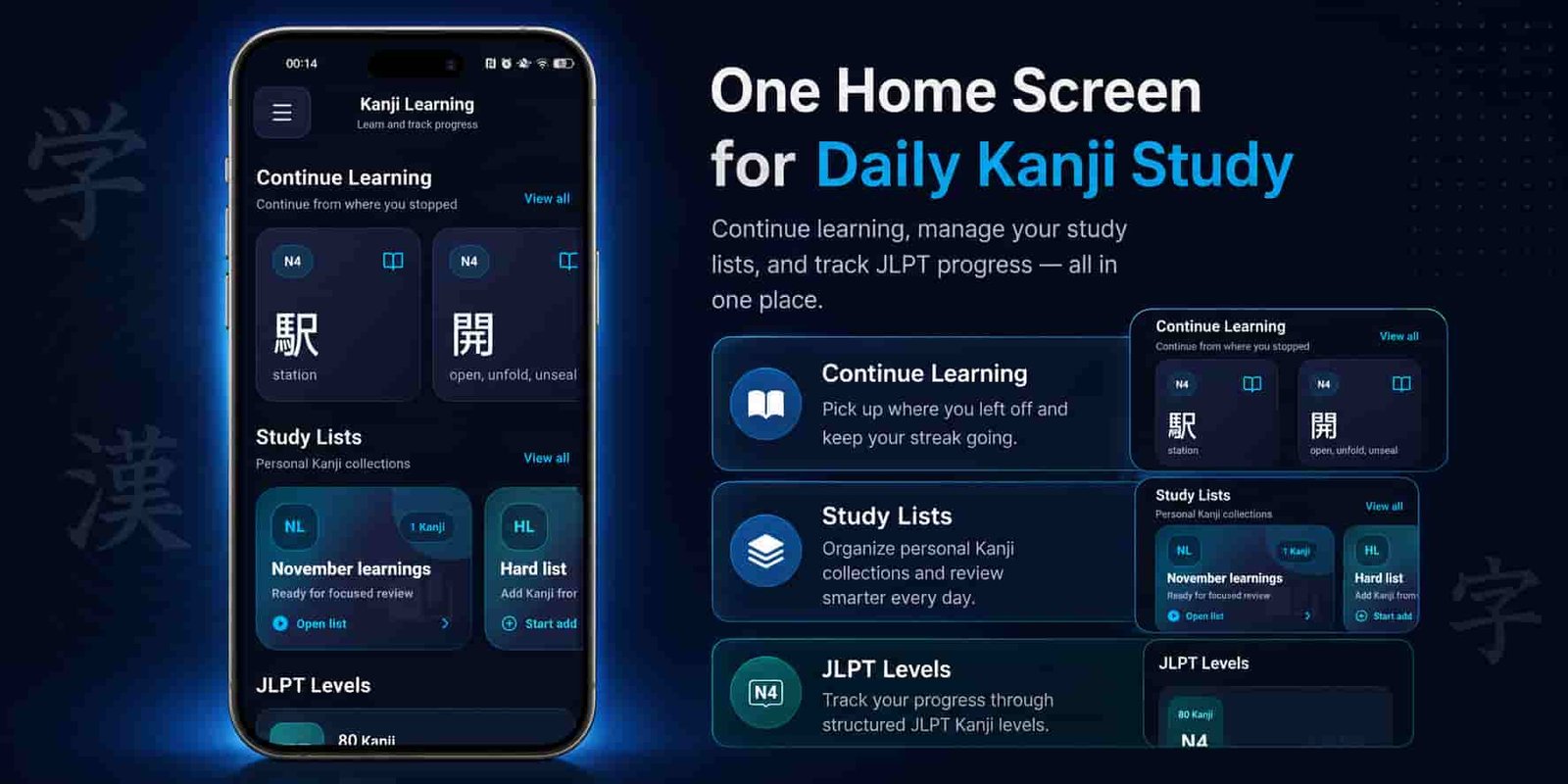
Learn Kanji is built around what happens after you find a character. You can open its detailed page, review the information, mark it as Learning, practise writing it, take a quiz, save a note or place it inside one of your own study lists.
This creates a more practical learning flow:
- Find a Kanji through a JLPT level or search.
- Study its meaning, readings and vocabulary.
- Mark it as Learning.
- Practise it using the canvas, games or quizzes.
- Add it to a personal study list when more revision is needed.
- Mark it as Learned when you feel confident.
The purpose is not to replace every Japanese learning resource. It is to give Kanji learners one organized place where information, practice and progress work together.
Study Kanji Through an Organized JLPT Path
Opening one enormous Kanji list can feel overwhelming, especially when you are studying for a particular JLPT level.
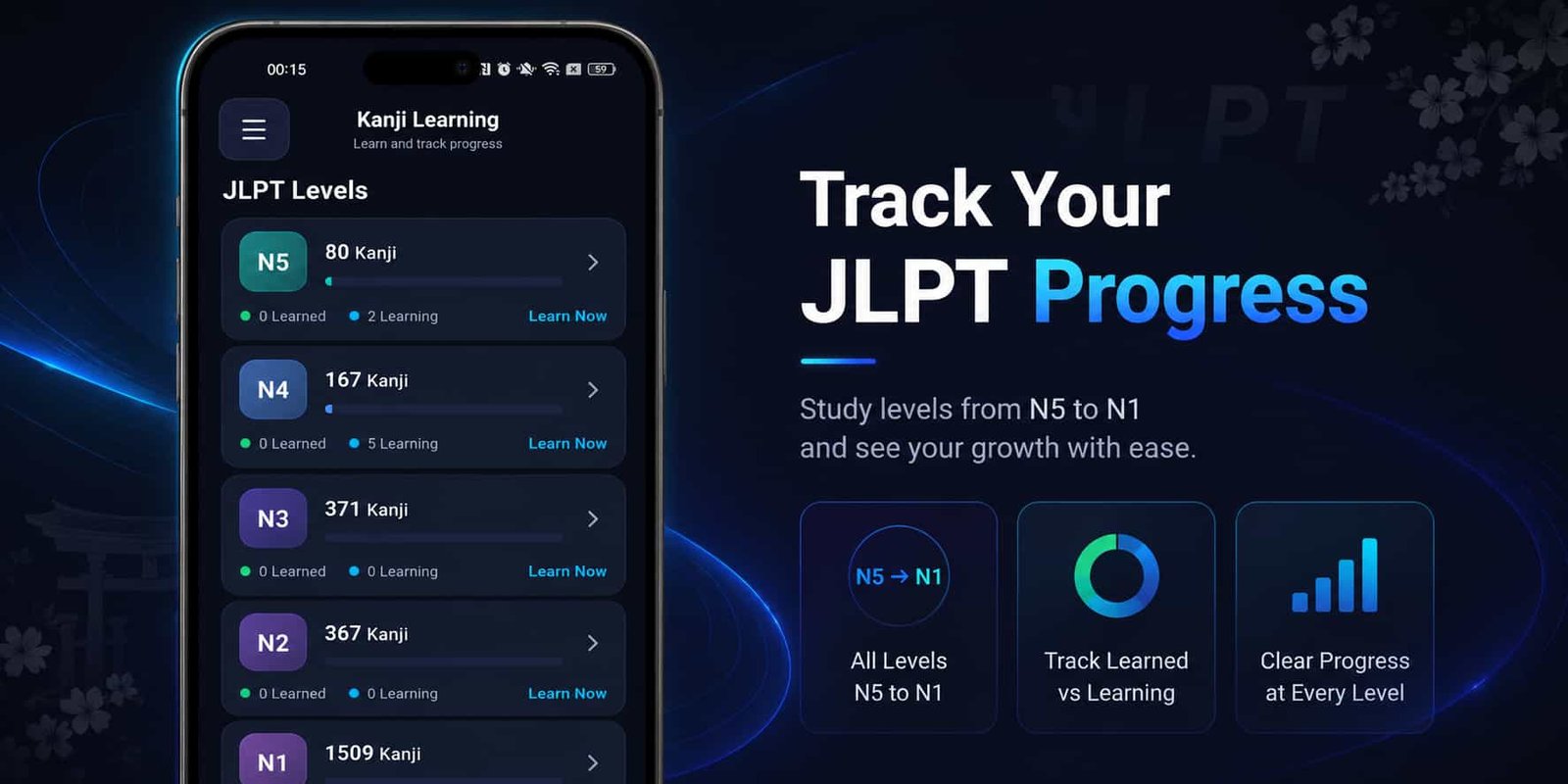
Learn Kanji organizes its content into JLPT N5, N4, N3, N2 and N1. A beginner can focus on N5 without being distracted by advanced characters, while experienced learners can move directly to N2 or N1 revision.
Each level also has separate progress information. You can see how many characters are being learned and how many have already been completed.
This makes study goals easier to understand. Instead of saying, “I need to learn Kanji,” you can set a clearer goal such as:
- Learn five new N5 Kanji today.
- Review the N4 Kanji still marked as Learning.
- Complete one N3 quiz set.
- Practise difficult N2 Kanji before the exam.
- Create an N1 weekly revision list.
Detailed Kanji Information in One Place
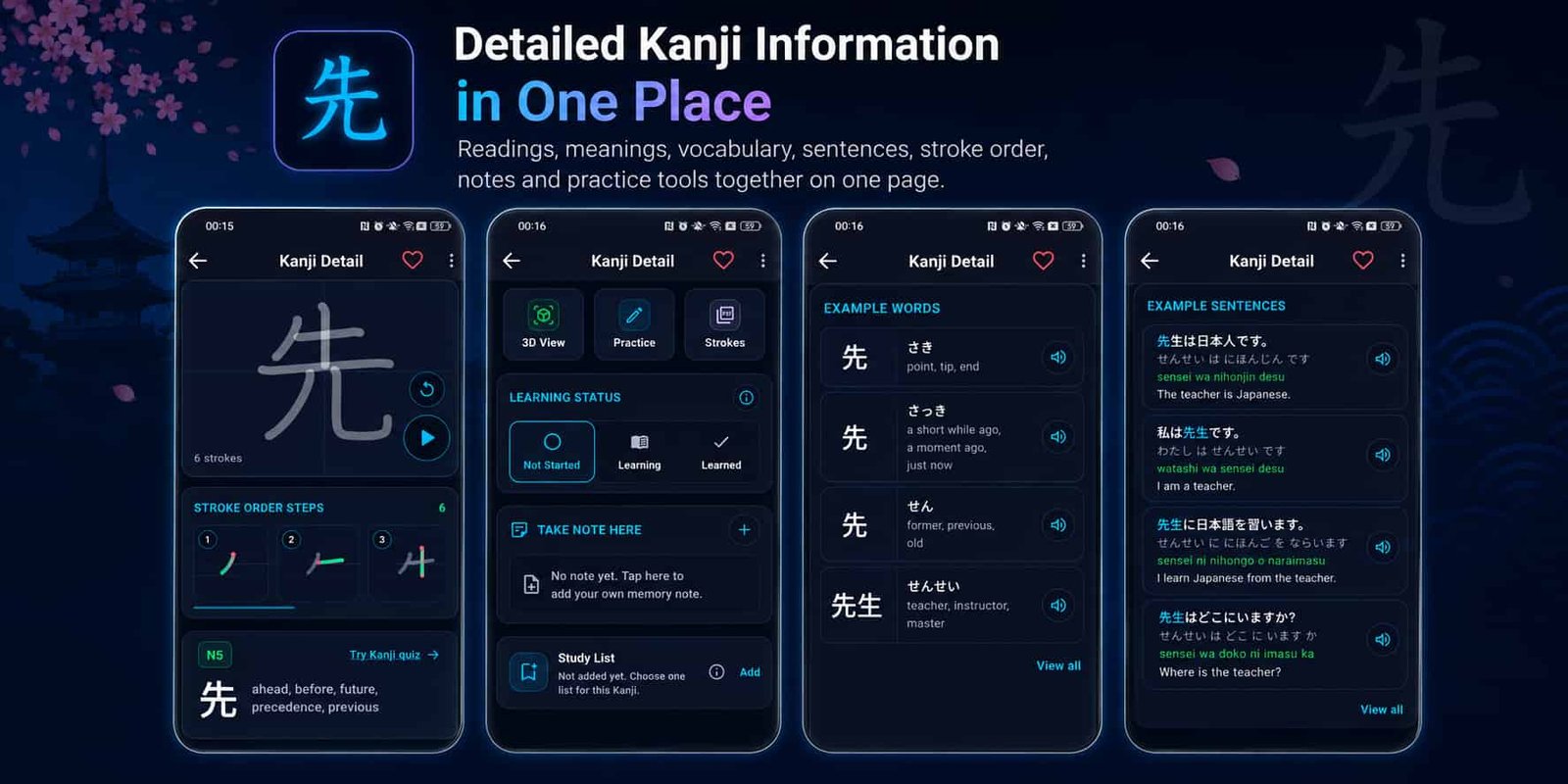
The Kanji detail page is where most of the learning happens. Instead of displaying only one English meaning, the page brings together information and practice tools related to the selected character.
Depending on the available data, a Kanji page may include:
- English meanings
- Onyomi readings
- Kunyomi readings
- JLPT level information
- Japanese example words
- Hiragana readings
- English translations
- Related vocabulary
- Example sentences
- Similar-looking Kanji
- Stroke information
- Writing and quiz actions
This matters because a Kanji does not always have one fixed reading. Its pronunciation and meaning can change depending on the word in which it appears.
Studying words alongside the character helps learners understand how the Kanji is actually used. It also makes the character easier to recognize when it appears in books, websites, workplaces, signs or JLPT questions.
An Advanced Canvas for Real Kanji Writing Practice
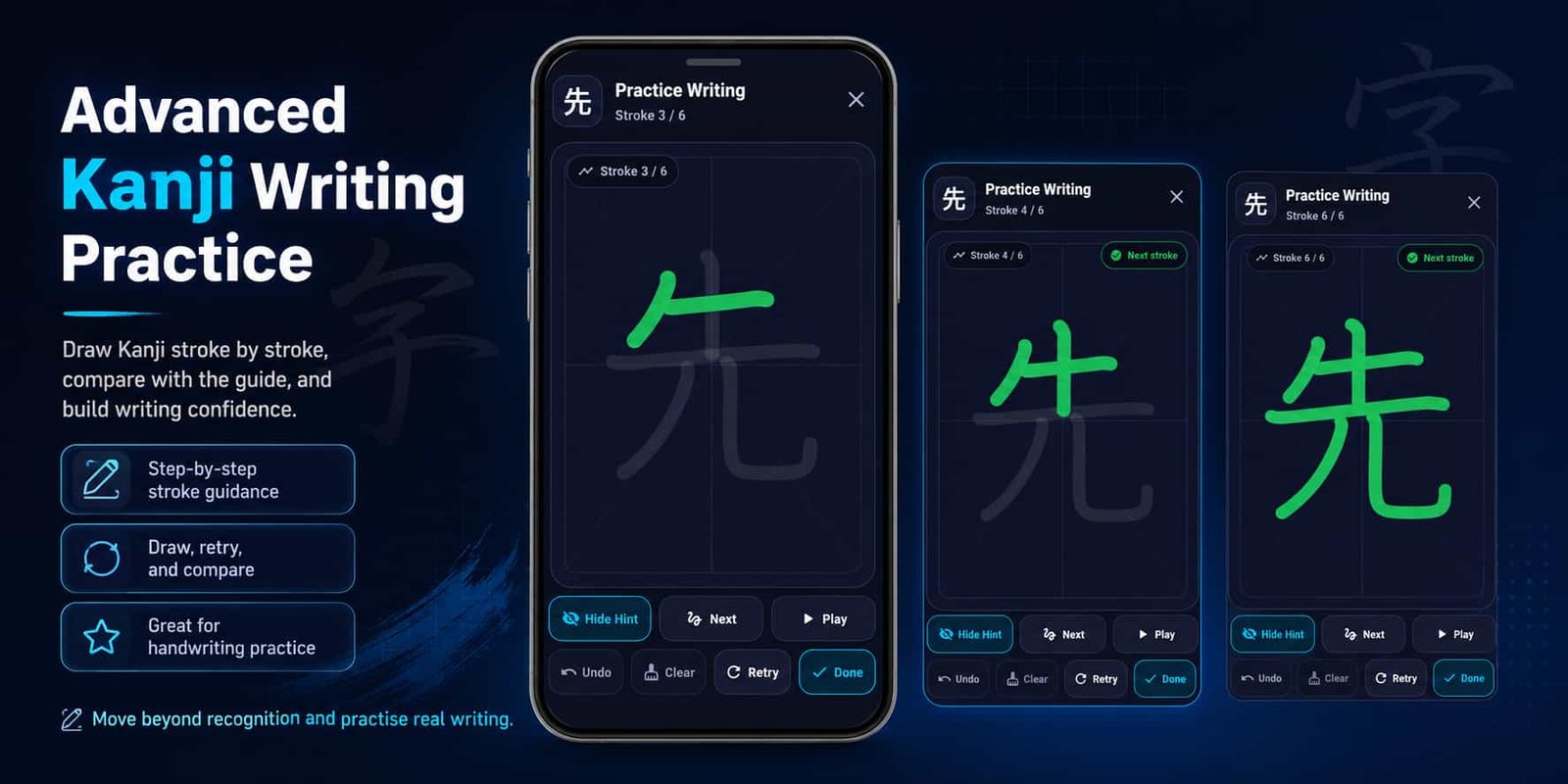
Recognizing a Kanji on a screen and writing it by yourself are different skills. A learner may recognize a character immediately but struggle to reproduce it without looking.
The app includes an advanced interactive practice canvas where you can draw Kanji directly with your finger. The canvas gives you a dedicated space to practise the shape and movement of the character rather than only looking at a static image.
You can draw the Kanji, compare your attempt with the guide, clear the canvas and try again. Repeating this process can help develop better visual memory and make complicated characters feel more familiar.
The canvas is especially useful when:
- You frequently forget part of a Kanji.
- You confuse two characters with similar shapes.
- You want to remember stroke direction more clearly.
- You are practising handwriting for school or work.
- You learn better by doing rather than only reading.
Writing practice is not forced on every learner. It is available as another learning option when you want to move beyond reading and recognition.
Explore Supported Kanji with the Interactive 3D Viewer
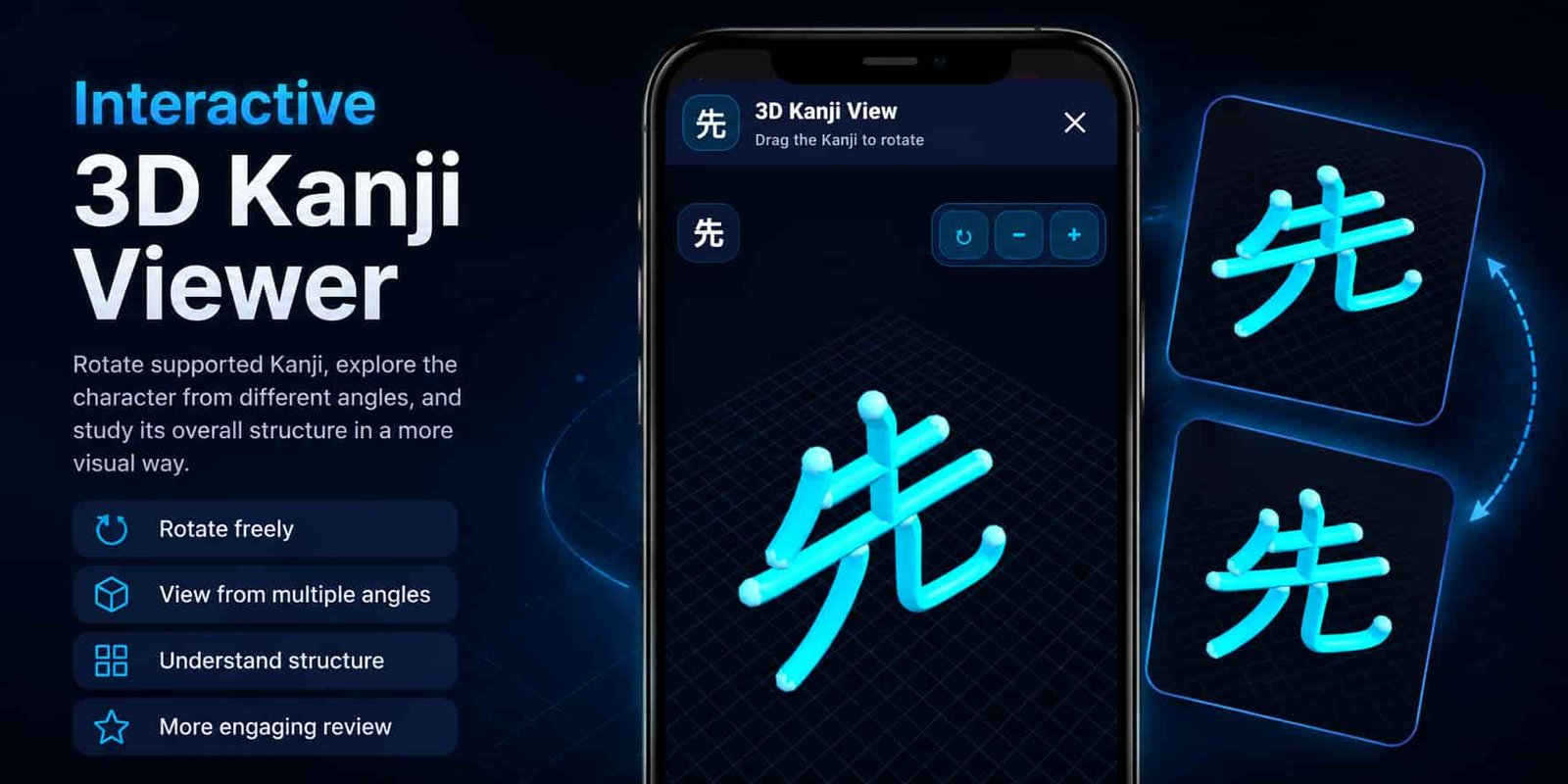
The app also includes an interactive 3D Kanji viewer for supported characters.
Instead of viewing the Kanji only as flat text, you can rotate the model and examine it from different angles. This provides another visual way to become familiar with the character’s overall structure.
The 3D viewer is not intended to replace normal reading or writing practice. It works as an additional visual tool that can make study more engaging, especially for learners who remember shapes more easily when they can interact with them.
It may also help you pay closer attention to:
- The overall balance of the character
- The position of its different components
- The relationship between the left and right sides
- The way similar-looking Kanji are structured
- Complex characters that are difficult to remember as flat text
Create Study Lists That Match the Way You Learn
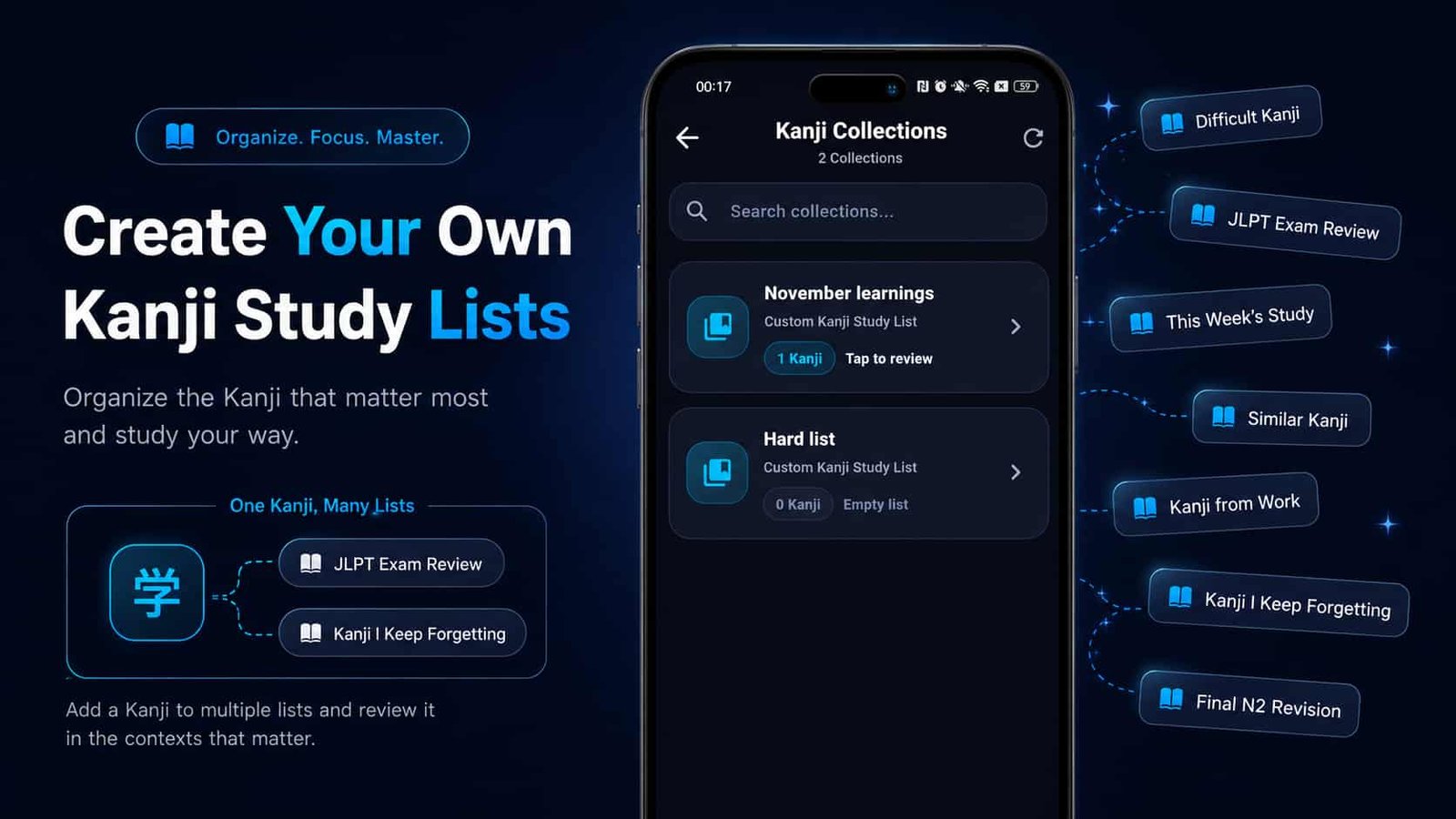
Every learner struggles with different Kanji. A character that is easy for one person may be difficult for someone else.
That is why the app allows you to create your own Kanji study lists instead of giving you only one fixed favourites collection.
You can create lists such as:
- Difficult Kanji
- JLPT Exam Review
- This Week’s Study
- Similar Kanji
- Kanji from Work
- Kanji I Keep Forgetting
- Final N2 Revision
One Kanji can be added to more than one list. For example, a difficult N3 character could appear in both your Difficult Kanji list and your N3 Exam Review list.
You decide the list names, descriptions and study purpose. This gives you more control than a system where every learner must follow exactly the same revision list.
Keep Learning and Learned Kanji Separate
It becomes difficult to stay organized when every Kanji appears in the same list, whether you know it or not.
In Learn Kanji, each character can have one of three simple learning states:
- Not Started: You have not begun actively studying it.
- Learning: You are currently reviewing and practising it.
- Learned: You feel confident recognizing and understanding it.
Kanji marked as Learning appear in a dedicated learning list. They may also appear in the Continue Learning section on the home screen so you can quickly return to your current material.
Kanji marked as Learned are stored in a separate learned list. This keeps completed characters available for revision without mixing them with your active study material.
Practise with Kanji Games
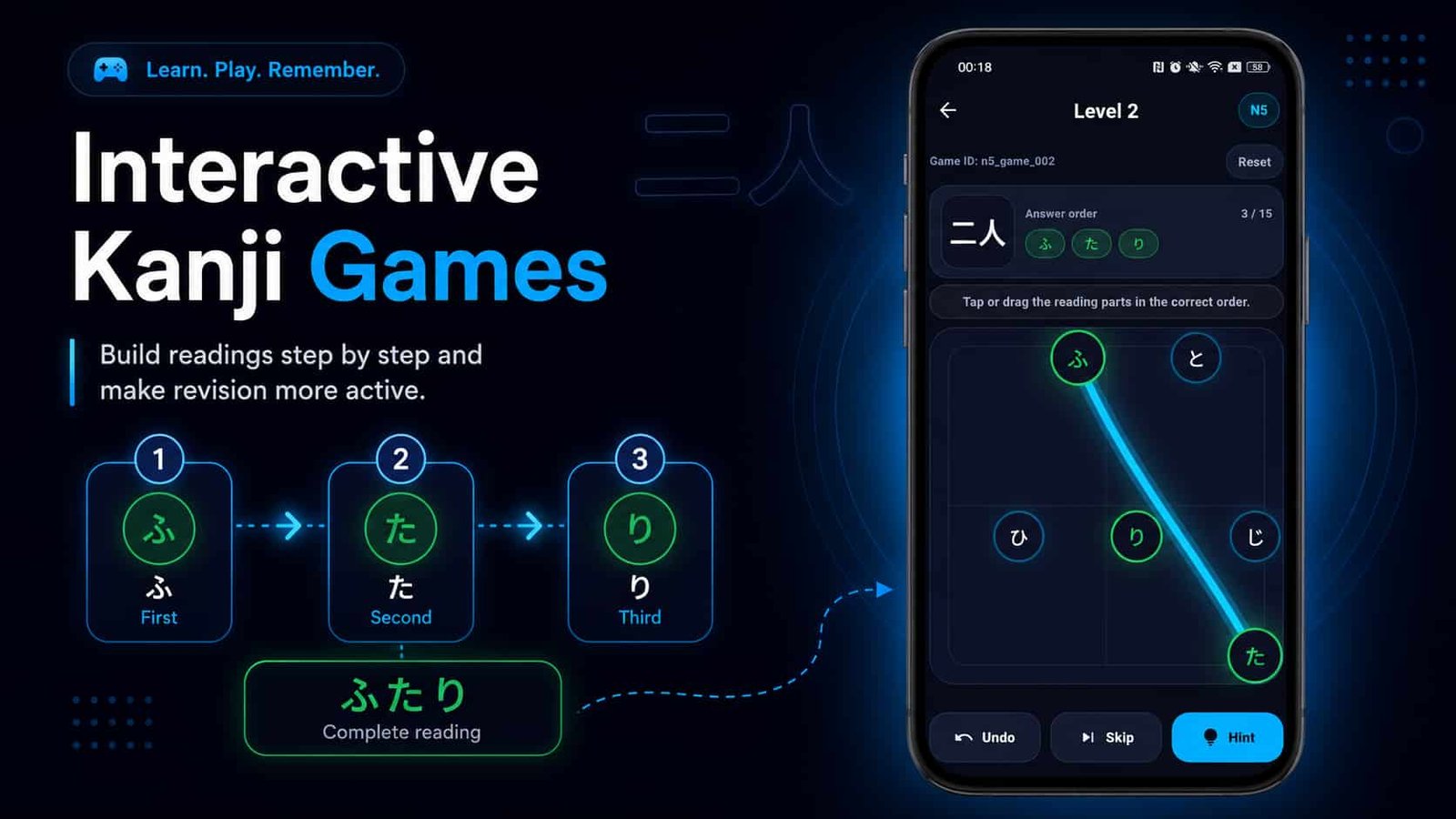
Studying in the same way every day can become repetitive. The app includes interactive Kanji games to make revision more active.
The games are organized by JLPT level and may ask you to recognize or arrange reading components. After answering, you can review the correct result and explanation.
The purpose is not simply to win a game. It is to make you actively think about the character, reading and vocabulary instead of only scrolling through a list.
Game completion is stored locally, making it easier to understand which activities you have already finished.
Test Yourself with JLPT Quizzes
The app includes JLPT quiz sets for learners who want to check what they remember.
You can select a JLPT level, open an available test and answer questions related to Kanji readings, vocabulary, meanings and usage.
Quizzes are useful because they reveal the difference between recognizing information while reading and remembering it without help. A Kanji may look familiar on the detail page but still be difficult when it appears inside a question.
After a quiz, you can review your performance instead of receiving only a final score.
Focused Practice for One Difficult Kanji
General JLPT quizzes are useful for testing a broad range of characters, but sometimes only one Kanji causes repeated problems.
The single-Kanji quiz feature is designed for that situation. From a supported Kanji page, you can start a focused quiz containing vocabulary, meanings or readings connected to that character.
A single-Kanji quiz can include up to 15 questions. Recent results are saved so you can compare your correct answers, wrong answers and scores across different attempts.
This gives you a direct way to concentrate on one problem area without taking a complete JLPT test every time.
Save Favourites and Personal Notes
Some characters are important enough that you want to reach them quickly. You can save those Kanji as favourites and open them later without searching the complete JLPT list again.
You can also write a personal note for an individual Kanji. A note might include:
- A memory trick that helps you remember the shape
- A reading you often confuse
- A word you saw at work or school
- A sentence from your textbook
- A reminder about a similar-looking Kanji
- A reason the character is personally important
These notes make your study material more personal. Instead of seeing only general information, you can connect the Kanji with your own experience.
Start Without Creating an Account
You do not need to register an account before using the main learning features.
After installing the app, you can open a JLPT level and begin studying. Your learning statuses, favourites, notes, custom lists and game completion information are stored locally on your device.
This keeps the first experience simple and avoids forcing learners to complete registration before they know whether the app is useful for them.
Because this information is stored locally, uninstalling the app or clearing its application storage may remove saved progress.
Free Access Without Locked JLPT Levels
Learn Kanji is free to use. You do not need to buy N5 first and then pay again to access N4, N3, N2 or N1.
The main learning features are available without requiring a paid subscription or lesson-pack purchase.
The app uses a limited amount of advertising to support continued development and data maintenance. However, the goal is to keep advertisements from interrupting every small study action.
Learning content remains the main purpose of the app.
A Modern Interface Designed Around Kanji
The app uses a dark navy interface with cyan highlights, clear cards and large Kanji text. This helps individual characters remain easy to see while keeping the surrounding controls visually organized.
The Home screen gives quick access to current learning material, custom lists, JLPT levels, quizzes and games. Kanji lists are designed to help you find a character quickly, while the detail page provides the deeper learning tools.
The interface aims to avoid unnecessary steps. You should be able to open the app, return to what you were learning and continue studying without navigating through a complicated menu system.
How Learn Kanji Approaches Common Study Needs
| Study Need | A Basic Single-Purpose Tool | Learn Kanji: JLPT N5–N1 |
|---|---|---|
| Checking a character | Meaning and one or two readings | Meanings, readings, vocabulary, examples, similar Kanji and practice tools |
| Writing practice | Static stroke picture | Interactive advanced canvas for repeated drawing practice |
| Visual exploration | Flat text only | Interactive 3D viewer for supported Kanji |
| Organizing difficult Kanji | One favourites list | Favourites, notes and multiple custom study lists |
| Tracking progress | Completed or not completed | Not Started, Learning and Learned statuses for each JLPT level |
| Testing knowledge | One quiz style | JLPT quizzes, interactive games and single-Kanji quizzes |
| Starting the app | Registration may be required | No account required for the main learning features |
| Accessing levels | Some levels may require separate purchases | Free study access from JLPT N5 through N1 |
Who Is This Kanji Learning App For?
- Complete beginners starting with JLPT N5
- N4 and N3 learners building stronger reading skills
- N2 and N1 learners organizing advanced revision
- Students preparing for a future JLPT examination
- Learners who want to practise writing on their phones
- Visual learners interested in a 3D Kanji viewer
- People who enjoy learning through games and quizzes
- Learners who often confuse similar-looking Kanji
- Students who want personal notes and custom lists
- People who prefer to begin without creating an account
- Learners looking for a free Kanji study app
How to Start Using Learn Kanji
- Install Learn Kanji: JLPT N5–N1 from Google Play.
- Choose the JLPT level that matches your current ability.
- Open a Kanji you want to study.
- Review its meanings, Onyomi, Kunyomi and vocabulary.
- Change its learning status to Learning.
- Practise drawing it with the advanced canvas.
- Open the 3D viewer when it is available for that Kanji.
- Take a game, JLPT quiz or single-Kanji quiz.
- Add difficult characters to a custom study list.
- Save a personal note or mark the Kanji as a favourite.
- Change its status to Learned when you feel confident.
Build a Kanji Study System That Works for You
Study from JLPT N5 to N1, practise writing, explore supported Kanji in 3D, create personal lists and track your progress.
Download Learn KanjiWhy We Believe the App Is Different
No single feature can make learning Kanji effortless. Progress still requires regular study, repetition and patience.
What makes Learn Kanji different is the way its features support each other.
You can begin with a structured JLPT list, open a detailed character page, study readings and vocabulary, practise drawing on the advanced canvas, explore the character in the 3D viewer, test yourself with a quiz and save the Kanji inside your own revision list.
You do not need to move between several unrelated apps every time you change from reading to writing or from learning to revision.
Conclusion
Learning Kanji is a long process, and different learners need different ways to remember what they study.
Learn Kanji: JLPT N5–N1 combines structured JLPT levels, detailed Kanji information, example vocabulary, an advanced writing canvas, an interactive 3D viewer, Kanji games, JLPT quizzes, single-Kanji quizzes, progress tracking, favourites, personal notes and custom study lists.
The app is free, does not require an account for its main learning features and avoids locking individual JLPT levels behind separate purchases.
Whether you are learning your first N5 characters or reviewing difficult N1 Kanji, the app gives you an organized place to learn, practise and keep track of your progress.
View Learn Kanji on Google Play